Countdown
March 2026 ship-every-week
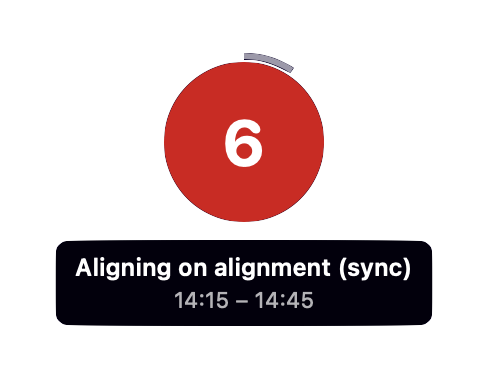
I used to miss appointments and meetings. Without coping mechanisms I’d look at my calendar, see a meeting in 20 minutes, start on a small task, then look up to see the meeting started half an hour ago.
I suffer from time blindness, an inability to accurately perceive how much time is passing. I’ve been building workarounds since university – terminal reminders, physical alarm clocks, multiple alerts on my computer and phone, and checking my calendar far too often. It’s anxiety-inducing and I never fully appreciated how much I had to do just to get to things on time.
One of my recent solutions is displaying the time to my next meeting on my menu bar (I use Sketchybar), the background turning increasingly red as the meeting approaches, flashing when there’s a minute to go. It worked well, until a recent effort to maximise flow state by hiding everything on my screen highlighted the tensions of the maker/manager schedule.
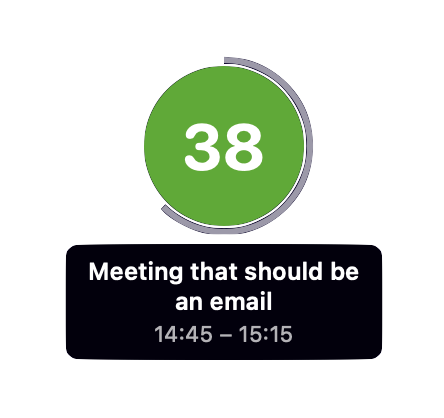
A friend shared she has the same problem. As my existing solution is tied to Sketchybar, I built a Mac desktop app in Swift. Countdown shows a circle on your desktop with the number of minutes until your next meeting, a ring on the outside of the circle representing that time, and optionally the meeting title and times.
I haven’t built a native Mac app in a few years, and I’ve never built anything significant in Swift. A few years ago I wouldn’t have tried this, or if I did the post would have been about the weeks-long journey of learning Swift and the macOS APIs. Now it’s barely worth mentioning.
Huge thanks to Tim Searle, somebody who actually knows Swift and security, for reviewing the Countdown code.